
Opponent Prep (Updated)
Preparing for your next opponent using trends, openings, and real game data.On my journey into building analytical chess tools, one of the first features I ever shipped was Opponent Prep, released on 27th August 2024. At the time, the goal was simple: give players a practical way to study an upcoming opponent using real data, without drowning in engine lines or spreadsheets. It did the job — but like most early projects, it reflected where my skills were then, not where they are now.
Over the past year, as Chessboard Magic has grown and my own development skills have improved, I’ve been steadily revisiting older tools and rebuilding them properly. Opponent Prep is one of those tools. The updated version is faster, clearer, and far more useful in actual game preparation — focusing on tendencies, patterns, and exploitable habits rather than raw noise.
TL;DR — use it for free here:
https://chessboardmagic.com/opponentprep
Below, I’ll walk through what the tool does and how you can use it to prepare more effectively for your next game.
What the tool actually does
Opponent Prep allows you to import and compare two online chess profiles (from lichess.org or chess.com) and analyse how you and your opponent really play. Once the games are loaded, the application gives you four different views, each designed to answer a specific prep question.
1. Summary
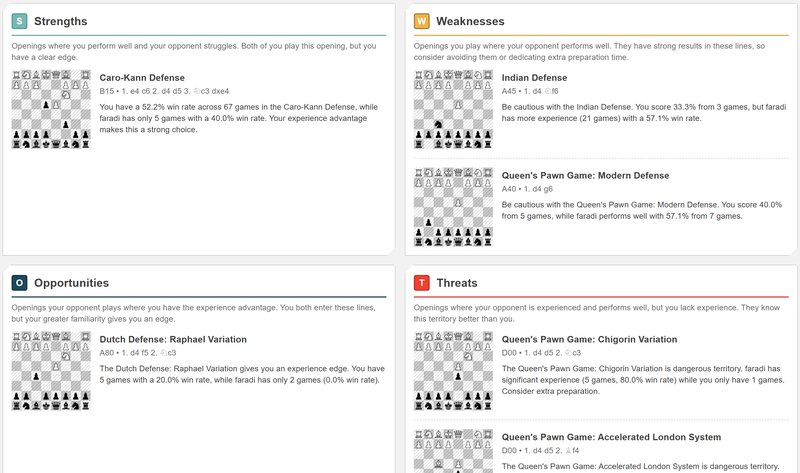
This is the high-level overview. Here you can see recent data and performance trends for both players, along with an Opening SWOT analysis, split by playing as White or Black.
The SWOT categories are defined as follows:
- S – Strengths
Openings where you perform well and your opponent struggles. You both play these lines, but the results clearly favour you. - W – Weaknesses
Openings you play where your opponent performs well. These are danger zones, either avoid them or spend extra preparation time here. - O – Opportunities
Openings your opponent plays where you have the experience advantage. You both enter these lines, but your greater familiarity gives you an edge. - T – Threats
Openings where your opponent is experienced and successful, while you lack experience. They know this territory better than you do.
The idea isn’t to tell you what you must play, but to help you make informed choices:
- Which openings should you aim for?
- Which ones should you avoid?
- And where do you actually need to prepare?
2. Opening Table
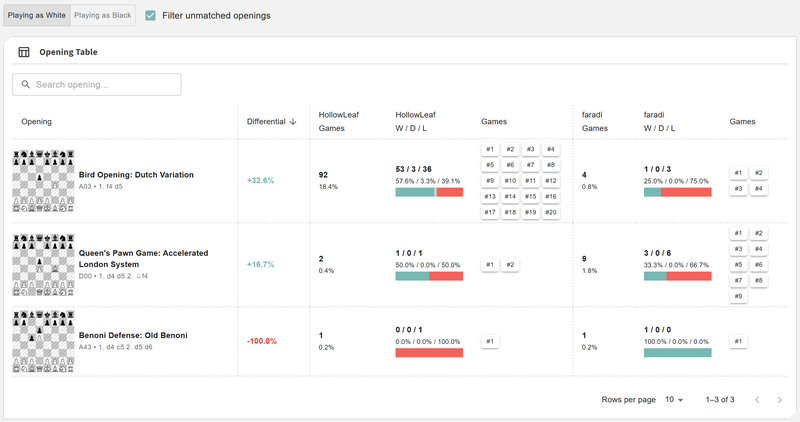
The Opening Table is where you can dig into the numbers.
Here you’ll see your opening performance statistics side by side with your opponent’s, including games played, results, and win differentials. This makes it easy to spot openings that look fine in theory but perform poorly in practice, or openings where a small edge shows up consistently over many games.
If the Summary tells you where to look, the Opening Table helps explain why.
3. Opening Explorer
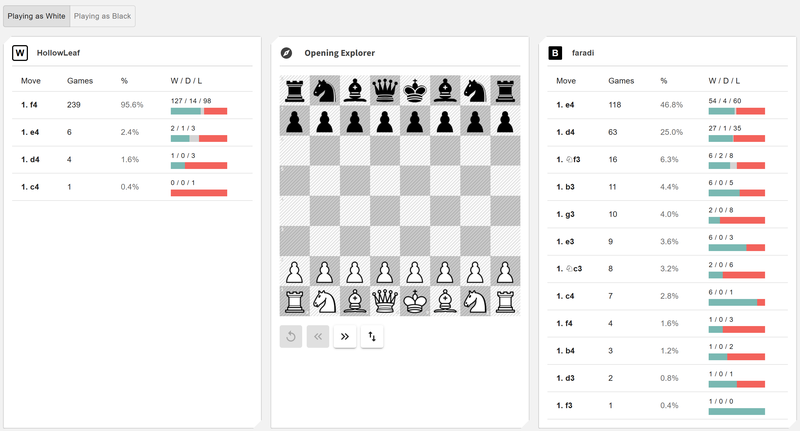
This view is essentially OpeningTree.com, but personalised for both you and your opponent.
You can play through move sequences on the board and see:
- what your opponent actually plays,
- what positions they have experience in,
- what you typically face or respond with,
- and how your repertoires intersect.
The goal here is practical prep. Instead of memorising abstract theory, you can explore likely positions, see what your opponent prefers, and think about how you want to respond.
4. Games Explorer
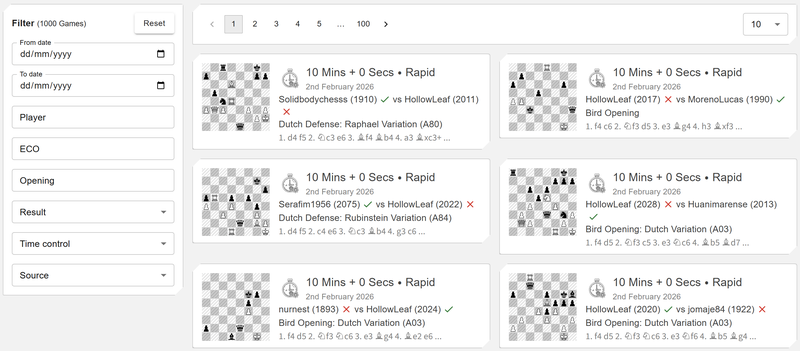
This is the raw data behind everything else.
You can browse through and play through the imported games, filter them, and explore specific matchups or time controls. Sometimes the fastest way to understand an opponent is simply to watch how they win, and how they lose.
This view is especially useful for spotting recurring plans, endgame tendencies, or opening setups that don’t always show up clearly in summary stats.
Final thoughts
The aim of Opponent Prep is simple: help you prepare smarter, not longer. Instead of guessing what your opponent might play, or over-preparing everything, the tool helps you focus on the openings and positions that actually matter for this matchup.
If you try it out, I’d love to hear what you think, feedback from real players is what drives the next round of improvements.
You can use it here: https://chessboardmagic.com/opponentprep
Kind Regards,
Toan Hoang (@HollowLeaf)
You may also like
 HollowLeaf
Integrating Maia2 (The Human-Like Chess Engine) into My Chess Application
A beginner-friendly look at human-style AI, neural networks, ONNX models, opening books, and everyth… CM HGabor
How titled players lie to you
This post is a word of warning for the average club player. As the chess world is becoming increasin… HollowLeaf
Suspicious Chess App Idea?
Suspicious Games, Engines, and Paranoia HollowLeaf
AI Chess Coaches?
Is It Possible? HollowLeaf
In Search of Brilliancies in Chess
!! GM Avetik_ChessMood