
https://siderite.dev/blog/new-chrome-extension-lichess-tools/
How to train against your worst mistakes using LiChess Tools
...Just replay your games using Explorer Practice and check the eval
So this is another post about how LiChess Tools can help you improve your chess significantly, but also how you can do it using vanilla Lichess. More details about this Chrome/Firefox extension here: https://siderite.dev/blog/new-chrome-extension-lichess-tools/
The problem
How many times did you hear that in order to improve you have to analyze your games? And how many times did you hear exactly how to plan your analysis and when and how to do it? Me, I hear that I have to analyze my games all the time and almost never about how to do it. But what I am going to focus on in this post is WHEN to do it, which I believe is the major issue here.
You see, playing chess and analyzing chess require different mindsets. You can't ask someone to play then immediately analyze their game unless they specifically started a game with the plan to review and learn afterwards.
However, once you spent an entire day playing games (and losing a lot of them, like I do) you hardly have to the mood to start reviewing them and learning chess.
So you don't do analysis at the end of a game and you don't do it at the end of a session. You say "I am going to do it in the future". Yet in the future, you become overwhelmed by the sheer amount of games you have not reviewed. And if you try... oof! in that one you hung your queen, in that one you missed mate in 1 and lost on time, in that one you forgot the theory. The act of even choosing a game to review is torture.
The solution
There is a simple way to get around all of that. You use the Explorer tool in Lichess to replay your games. Let's say you want to review your White play. In that case you
- go to Analysis board
- open Explorer (the little "book" icon under the move list)
- go to the Player tab in Explorer
- select your own username playing with White
- if you have LiChess Tools and the Me button feature enabled, use the Me tab to switch between you and the previously selected player
Now you have in the Explorer the moves you made and the replies other players had for you.
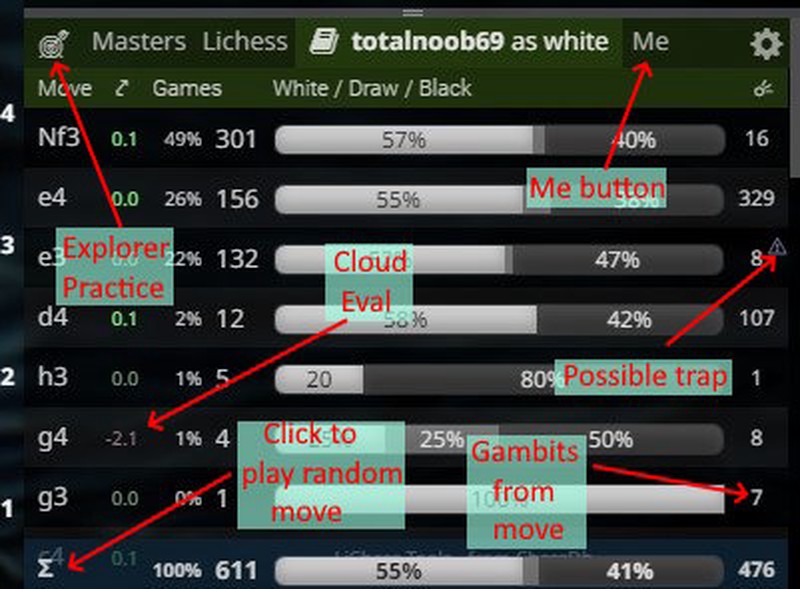
From here, the process is simple:
- when it's White's turn, make a move
- when it's Black's turn, choose a move from the Explorer
- analyze how the position changes and what move would have been better
If you have LiChess Tools installed, you can simply turn on Explorer Practice (the small "arrow in target" tab in Explorer) and it will make the opponent moves for you, based on how often opponents played them.
To see what you should have done you can either change Explorer tabs to Master or Lichess and see what other people have done (if you have LiChess Tools you will see the cloud evaluation of moves directly in the Explorer list) or turn on the computer engine evaluation.
Now it's not a matter of individual games, but individual positions. You see how often you chose one move or another and how good that is for you. More important, you can go back and forth and focus on a specific part of your opening repertoire rather than review ten different kinds of lessons from a single game, making it hard to remember what you learned where.
Even better! Once you went through the most common lines you wanted to review and the best replies for each, you can save the entire thing as a study, so you can always have it stored and updated. And you can do it whenever you feel you need to do analysis, giving yourself permission to play chess whenever you want without pressure.
Thanks!
As always, let me know of any ideas for improvement. LiChess Tools will always be focused on improving your chess experience and will always remain free, just like Lichess. Enjoy!
You may also like
 GM Avetik_ChessMood
10 Things to Give Up to Enjoy Chess Fully
Discover how embracing a lighter mindset can help you enjoy chess again and achieve better results. TotalNoob69
Full repertoire using PGN Editor, Explorer Practice and Bookmarks
... a LiChess Tools use case TotalNoob69
The world didn't end
... yet TotalNoob69
An unexpected insight on d-pawn pushes/openings
TL;DR; Pushed d-pawns indirectly defend the second rank f square. TotalNoob69
How many weird gambits can you get from the Van Geet?
Van G-amb-eet with LiChess Tools TotalNoob69